File verificationSignature matches the developer’s certificate
Unmodified file: same certificate as this app’s versions from the official app store, signed by Netgenius (Michael Kopplin). A signature shows who signed the file, not how the app behaves.
App permissions
Asks first: 7, Special access: 1, Granted automatically: 10
Hi, There you can download APK file "Business Calendar" for Android free, apk file version is 1.6.1.4 to download to your android device just click this button. It's easy and warranty. We provide only original apk files. If any of materials on this site violates your rights, report us
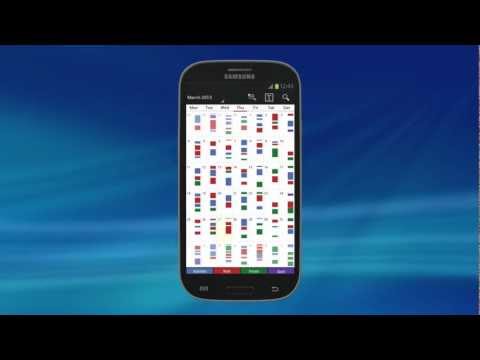
Business Calendar has everything you need in a calendar app: It provides an excellent overview of your appointments, it’s easy to use and it gives you powerful tools to create and manipulate your events.
★ "Our favorite calendar app on Android, due to its flexibility and ease of use." - Lifehacker 01/2014 ★
★ "One of the best Calendar Apps for 2014" - FastCompany ★
Features
▪ Quick Day View: for a fast overview of all events of the day
▪ Favorite Bar: for direct access to all your calendars
▪ smooth scroll and zoom: for better, intuitive interaction
Details
▪ month, week, day, agenda and event view
▪ color-coded year view
▪ scroll- and zoomable multi-day view (1-14 days)
▪ easy switching between timeline bars and event titles in month view
▪ search function
▪ sync your events with Google Calendar, Microsoft Outlook, Exchange etc. using the Android calendar synchronization
▪ professional widgets for month, week, agenda and day view
▪ intuitive handling: just move your finger over some days of interest in month view to open them in multi-day view
▪ many options for recurrent events (e.g. an event that takes place every other week on Tuesday and Thursday)
▪ birthday calendar
▪ context-sensitive help system to optimize your workflow
This free version is ad-supported, but still fully functional. If you’re a heavy calendar user, we believe the best solution for you is the pro version: without ads and with more useful features like:
▪ manage contacts: link contacts to your events
▪ customizable templates: create your own templates for new events
▪ multi-selection: delete, move or copy multiple events at once
▪ drag&drop: move and copy events easily in the multi-day view
▪ tasks add-on: use the integrated task-management tool to sync with Google Tasks & Toodledo
▪ notifications: comprehensive reminder functionality
▪ app theming: light and dark theme for the app
▪ advanced widgets: set colors, font sizes and individual calendars
▪ import & export: quickly import or export all your calendars in .ics format
Explore the version history of Business Calendar for Android and see how the app has evolved over time. This section tracks versions added to the apkcafe-ir.com catalog, including download size, declared permissions, and Android compatibility. Select a time period or a point on a chart to explore historical version data.
1 new Business Calendar version was added to the apkcafe-ir.com catalog in 2025. The catalog contains 15 versions dating back to June 2017.
The Business Calendar download size for most phones increased from 6.73 MB in version 1.4.9.1 (2017) to 8.72 MB in version 1.6.1.4, a 30% increase.
Business Calendar 1.6.1.4 declares 18 permissions, 7 more than version 1.4.9.1 from 2017 (11).
Business Calendar 1.6.1.4 requires Android 4.1 or newer and is built for Android 14.
Older versions of Business Calendar. The apkcafe-ir.com catalog has 15 versions of Business Calendar, from 1.4.9.1 (Jun 2017) to Business Calendar 1.6.1.4 (Jul 1, 2025). If the latest version has a bug, changed something you rely on or does not work on your phone, you can install an earlier one from the list of older Business Calendar APK versions below.
Android does not install an older version over a newer one, so uninstall Business Calendar first. This usually deletes the app's data on the phone, so back up anything you need.
Dates show when each version was added to the apkcafe-ir.com catalog. Size is the full download for most phones; permissions are for the same build.
A permission shows what the app can access, not that it uses it.
No special hardware required.
Changes since 1.6.1.3.
Added in this version